
1. Execution model and security boundary
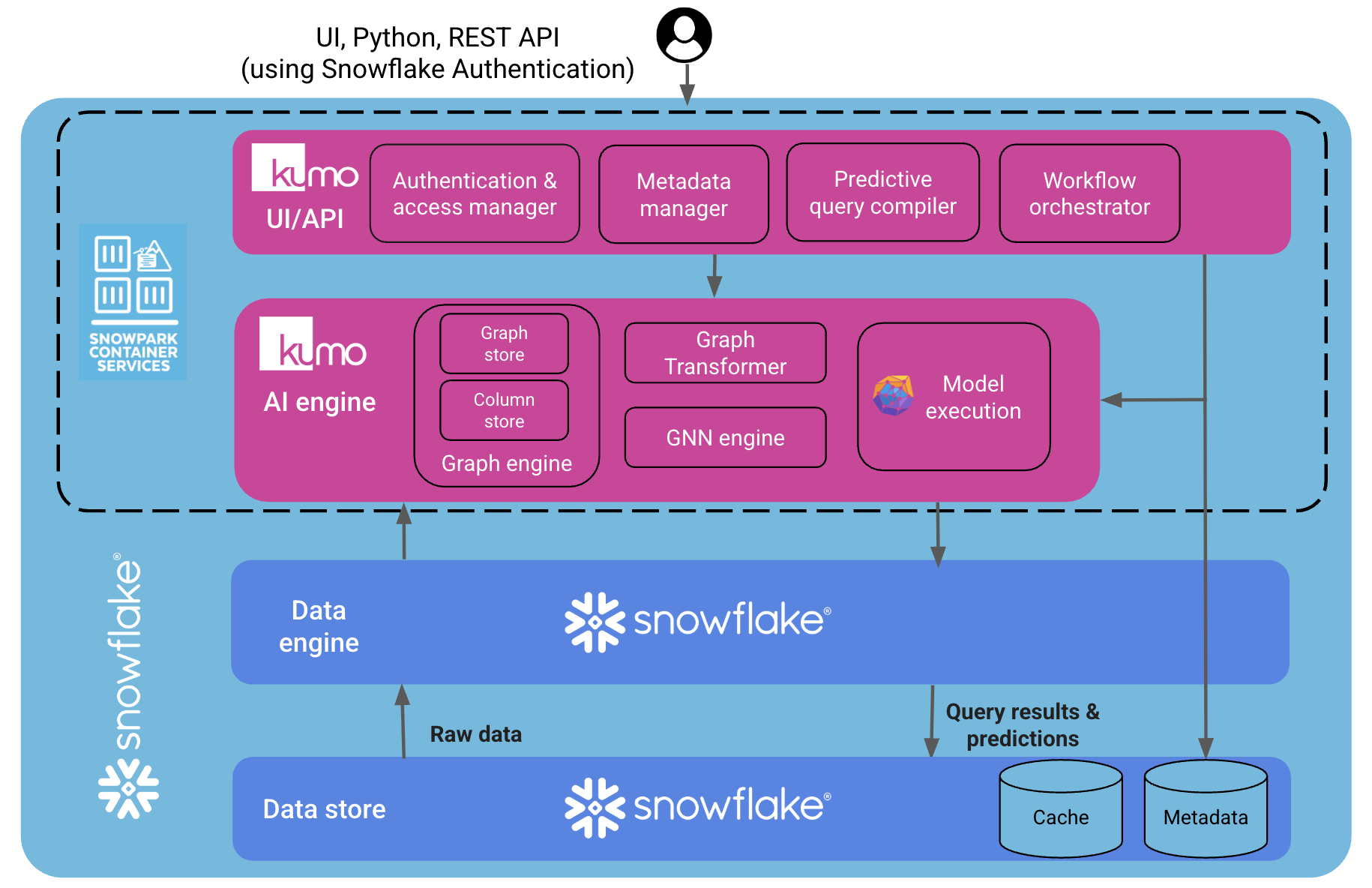
Kumo runs as a set of SPCS services deployed into your Snowflake account:- Containers are scheduled, isolated, and monitored by Snowflake’s SPCS control plane, as described in the SPCS service documentation.
- Data access occurs only over Snowflake’s native interfaces (SQL, Snowpark, and the SPCS service APIs documented in the SPCS specification reference).
2. Data access and isolation
With the Snowflake Native App deployment, there is a clear separation between Kumo (the company) and Kumo (the app running in your account):- Kumo (the company) never has direct access to your data. Training data, intermediate datasets, model artifacts, and prediction tables are stored only in your Snowflake account.
- Kumo (the app) is a Snowflake application object that can process data only for the objects it is explicitly granted, using Snowflake’s standard role-based model as described in the Snowflake access control overview.
3. Data protection and limited service traffic
Kumo’s design is to keep customer data in Snowflake:- No training data or prediction results leave your Snowflake account. Model training and scoring happen inside SPCS containers, against data stored in your Snowflake databases.
- A small amount of non-data service metadata (for example, workflow orchestration information) is sent to Temporal Cloud to coordinate long-running workflows. This metadata does not include the tables being trained on or the model outputs.
- Container logs are written back into your Snowflake account (for example, into an event table or logging schema). If debugging is required, you can temporarily allow Snowflake or Kumo support personnel to see only those logs, rather than granting access to your underlying data.
4. App approval and security review
Kumo is distributed through Snowflake’s Native App framework and has undergone Snowflake’s security review for apps with containers:- The application adheres to the security requirements and best practices for Snowflake Native Apps.
- Kumo’s SPCS-based architecture is aligned with Snowflake’s own guidance for securing Native Apps that use SPCS, including container image scanning and configuration checks.
- The app participates in Snowflake’s automated security scan and ongoing vulnerability (CVE) evaluation as documented in the Native Apps security and CVE guidance.
5. What your team configures
Most of the work for your IT and security teams is simply following the standard installation steps and choosing the right roles and objects:- Install the app from Snowflake Marketplace and accept the required terms (Snowflake Marketplace consumer terms, third-party Python package terms, etc.).
- Run the provided setup script to create the databases, roles, and network rules used by Kumo in your account.
- Start the Kumo app and sign in using Snowflake credentials, as described in the Kumo installation guide:
Installing Kumo on SPCS.