
1. Architecture and isolation
The deployment has two halves, both inside your boundary:- Training, in your Snowflake account. The Kumo Native App, installed per the existing SPCS install runbook, trains and distills models. Distilled artifacts are written to an app-owned internal stage and then exported to your S3 bucket through a Snowflake storage integration that you control.
- Serving, in your AWS account. A dedicated EKS cluster runs KServe and Istio. A small Kumo-provided control plane pod (the control app) reconciles KServe
InferenceServiceresources, manages Istio traffic weights for canary/blue-green rollouts, and exposes a stable inference endpoint inside your VPC. KServe loads model artifacts directly from your S3 bucket using IAM Roles for Service Accounts (IRSA).
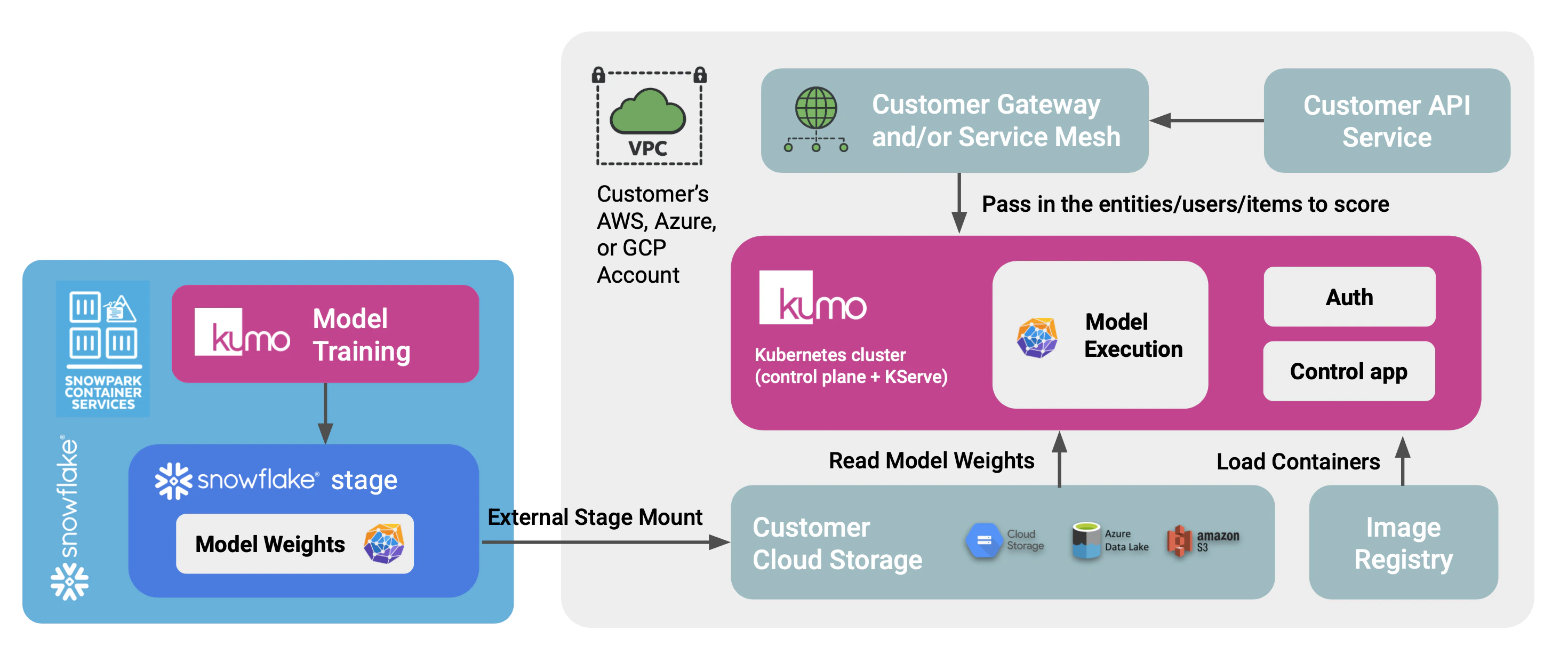
2. Model export from Snowflake
Trained, distilled models produced by the Kumo Native App land in an app-owned internal stage in the same artifact layout the serving stack expects (a Triton model repository, which is a collection of files). Promotion to serving is a one-time-per-rollout copy from that internal stage to a customer-owned S3 prefix, using a Snowflake storage integration plus external stage that you create. The Native App is grantedUSAGE on the external stage via a reference; it never holds AWS credentials.
Customer-side setup (one-time, performed by an ACCOUNTADMIN):
- Create an S3 bucket and IAM role that trusts the Snowflake account following Snowflake’s storage integration guide.
- Create the storage integration and external stage in Snowflake.
- Grant the Kumo Native App
USAGEon the external stage via the reference it requests during setup.
- The user trains and distills in the Native App (existing flow, unchanged).
-
The user calls a Native App stored procedure (e.g.,
CALL kumo.app.export_model('<model_id>')) which performsCOPY INTO @customer_external_stage/<model_id>/ FROM @app_internal/<model_id>/. -
The user registers and deploys the model via the Kumo online SDK (
kumoai.online) against the in-cluster control app:Subsequent rollouts of new versions usesvc.start_canary(...),svc.promote(), andsvc.rollback()for weighted traffic shifts.
3. Authentication
Authentication for SDK callers and inference traffic is designed to fit your existing internal patterns rather than impose a new one. We work with each customer to integrate with whatever you already run:- Service-to-service / mTLS. If your environment standardizes on internal m2m authentication (e.g., an Envoy-based service mesh, SPIFFE/SPIRE, or mTLS between workloads), the control app and inference endpoints can sit behind that layer and rely on it for caller identity.
- OIDC / JWT. The control app can also validate JWTs from any JWKS-compatible OIDC provider (Cognito, Auth0, Keycloak, Okta, etc.), with RBAC enforced from standard claims.
4. Data sources and protection
Your primary data stays in your platforms. The serving stack reads:- Model artifacts from your S3 bucket, via an IRSA-bound role that grants read-only access to a single artifact prefix.
- Inference requests from your internal callers, over your VPC network.
5. Network and dependencies
The deployment is self-contained inside your cloud account. Required dependencies are:- An EKS cluster (provisioned by the Kumo-provided Terraform).
- An S3 bucket for model artifacts.
- Outbound network access from Snowflake to your S3 bucket (via the storage integration’s IAM role; no Snowflake-side credentials required).
- An image registry reachable from the EKS cluster.
6. Operations and lifecycle
Image distribution. Container images and updates can be delivered through the registry or image distribution process approved by your security team. Kumo publishes versioned releases of the serving images and the control app image; how those images reach your cluster is your choice. Updates. Each module and Helm chart is versioned. Upgrades follow your existing change management process: pin a new version, plan, apply. Observability. Metrics stay internal. The serving stack exposes Prometheus metrics for KServe pods, Istio, and the control app, which can be scraped by your logging and metrics stack (CloudWatch, Cloud Logging, Datadog, Splunk, or your in-cluster Prometheus). Grafana dashboards are provided as a Terraform module and can be installed alongside or omitted. Support. Support is delivered without persistent Kumo access to your account. Diagnostics are gathered by your team and shared on the support channel as needed.7. Estimated infrastructure cost
The table below shows reference monthly AWS costs (us-west-2, on-demand) for three usage tiers. All tiers include a fixed control-plane footprint of three m5.large system nodes (always-on, spread across AZs to host Istio, the KServe controller, and the control app), one internal NLB, and EBS volumes for system nodes and the control-app PVC. CPU and GPU worker pools scale to zero when idle.
| Tier | Worker capacity | Workload that fits | Approx. monthly cost |
|---|---|---|---|
| Low | 1 × m5.2xlarge CPU pod | Small distilled or CPU-friendly models, light traffic, development and test | ~$580 |
| Medium | 2–3 × g6.4xlarge GPU pods | ~1,500–2,500 QPS aggregate at p99 <100 ms | ~$2,000–3,500 |
| High | 4–8 × g6.4xlarge GPU pods | 3,000–6,500 QPS aggregate at p99 <100 ms | ~$4,000–8,000 |